

SPS30 Particulate Matter Sensor
The sps30 sensor platform allows you to use your Sensirion SPS30
(datasheet) sensors with ESPHome.
The I²C Bus is required to be set up in your configuration for this sensor to work.
This sensor supports both UART and I²C communication. However, at the moment only I²C communication is implemented.
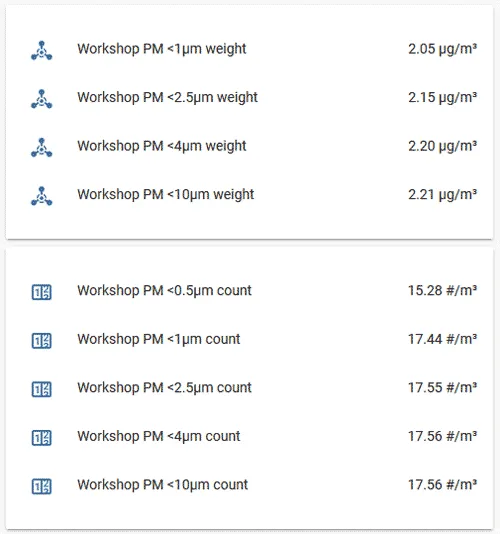
# Example configuration entrysensor: - platform: sps30 pm_1_0: name: "Workshop PM <1µm Weight concentration" id: "workshop_PM_1_0" pm_2_5: name: "Workshop PM <2.5µm Weight concentration" id: "workshop_PM_2_5" pm_4_0: name: "Workshop PM <4µm Weight concentration" id: "workshop_PM_4_0" pm_10_0: name: "Workshop PM <10µm Weight concentration" id: "workshop_PM_10_0" pmc_0_5: name: "Workshop PM <0.5µm Number concentration" id: "workshop_PMC_0_5" pmc_1_0: name: "Workshop PM <1µm Number concentration" id: "workshop_PMC_1_0" pmc_2_5: name: "Workshop PM <2.5µm Number concentration" id: "workshop_PMC_2_5" pmc_4_0: name: "Workshop PM <4µm Number concentration" id: "workshop_PMC_4_0" pmc_10_0: name: "Workshop PM <10µm Number concentration" id: "workshop_PMC_10_0" pm_size: name: "Typical Particle size" id: "pm_size" address: 0x69 update_interval: 10s idle_interval: 5minConfiguration variables
Section titled “Configuration variables”-
pm_1_0 (Optional): The information for the Weight Concentration sensor for fine particles up to 1μm. Readings in µg/m³.
- All options from Sensor.
-
pm_2_5 (Optional): The information for the Weight Concentration sensor for fine particles up to 2.5μm. Readings in µg/m³.
- All options from Sensor.
-
pm_4_0 (Optional): The information for the Weight Concentration sensor for coarse particles up to 4μm. Readings in µg/m³.
- All options from Sensor.
-
pm_10_0 (Optional): The information for the Weight Concentration sensor for coarse particles up to 10μm. Readings in µg/m³.
- All options from Sensor.
-
pmc_0_5 (Optional): The information for the Number Concentration sensor for ultrafine particles up to 0.5μm. Readings in particles/cm³.
- All options from Sensor.
-
pmc_1_0 (Optional): The information for the Number Concentration sensor for fine particles up to 1μm. Readings in particles/cm³.
- All options from Sensor.
-
pmc_2_5 (Optional): The information for the Number Concentration sensor for fine particles up to 2.5μm. Readings in particles/cm³.
- All options from Sensor.
-
pmc_4_0 (Optional): The information for the Number Concentration sensor for coarse particles up to 4μm. Readings in particles/cm³.
- All options from Sensor.
-
pmc_10_0 (Optional): The information for the Number Concentration sensor for coarse particles up to 10μm. Readings in particles/cm³.
- All options from Sensor.
-
pm_size (Optional): Typical particle size in μm.
- All options from Sensor.
-
auto_cleaning_interval (Optional): The interval in seconds of the periodic fan-cleaning.
-
address (Optional, int): Manually specify the I²C address of the sensor. Defaults to
0x69. -
update_interval (Optional, Time): The interval to check the sensor. Defaults to
60s. -
idle_interval (Optional, Time): If specified, puts the sensor into idle mode between readings for the specified amount of time.
Wiring
Section titled “Wiring”The sensor has a 5 pin JST ZHR type connector, with a 1.5mm pitch. (Matching connector housing, datasheet) To force the sensor into I²C mode, the SEL pin (Interface Select, pin no.4) should be shorted to ground (pin no.5)
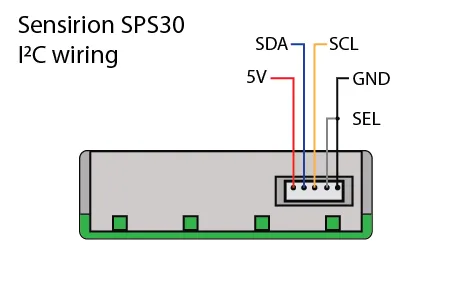
For better stability, the SDA and SCL lines require suitable pull-up resistors. Sensirion shows 10 kΩ resistors between VDD (5V, pin no.1) and SDA (pin no.2) and SCL (pin no.3) in the manual.
Automatic Cleaning
Section titled “Automatic Cleaning”The SPS30 sensor has an automatic fan-cleaning which will accelerate the built-in fan to maximum speed for 10 seconds in order to blow out the dust accumulated inside the fan. The default automatic-cleaning interval is 168 hours (1 week) of uninterrupted use. Switching off the sensor resets this time counter. Disabling of automatic-cleaning or setting a manual interval is not supported at the moment.
sps30.start_fan_autoclean Action
Section titled “sps30.start_fan_autoclean Action”This action manually starts fan-cleaning.
on_...: then: - sps30.start_fan_autoclean: my_sps30To be able to trigger the fan cleaning feature from Home Assistant, add a button as shown below, and trigger it with a (periodic) automation.
button:  - platform: template    name: "SPS30 fan clean"    on_press:      then:        - sps30.start_fan_autoclean: my_sps30
sensor:  - platform: sps30    id: "my_sps30"    ...
Sensirion recommends cleaning at least once per week.
Idle Operation Mode
Section titled “Idle Operation Mode”The SPS30 sensor can go into an idle operation mode where most internal electronics are switched off, including the fan and laser. This greatly reduces power consumption and can prolong the life of the sensor.
Specifying an idle_interval configuration parameter will automatically stop the sensor for that interval,
wake it when it is time, allow the sensor to warm up for 30 seconds, and take a reading before putting it back
into idle state.
The start and stop actions below allow users to manually take the sensor in and out of idle mode. Note that after the sensor is started, it does have a warm-up period of 30 seconds prior to outputting measurements.
See low power documentation for more information.
sps30.start_measurement Action
Section titled “sps30.start_measurement Action”This action manually puts the sensor into measurement mode.
on_...: then: - sps30.start_measurement: my_sps30sps30.stop_measurement Action
Section titled “sps30.stop_measurement Action”This action manually puts the sensor into idle mode.
on_...: then: - sps30.stop_measurement: my_sps30